CaptureiPhone app · in testing

Capture ideasby voice, beforethey're gone.

One tap, you speak, and your iPhone writes it down. Afterwards the idea is where you keep working, instead of waiting in your head for a quiet moment.

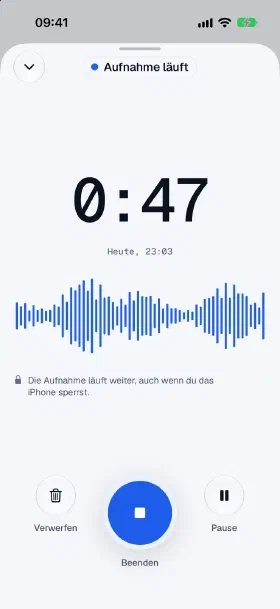
Capture during a recording: elapsed time 0:47, blue waveform and a note that the recording keeps running while the iPhone is locked
Why I'm building Capture

We speak faster than we write. And we think faster than we capture.

Ideas rarely come when I'm sitting at my desk. They come in the car, while running or in the evening just before falling asleep. In the car and while running I have no hand free, and in the evening I don't feel like typing a thought into tiny keys.

What I don't capture right away is gone. Not because the idea was bad, but because it never got a place. It isn't written down, isn't thought through further, isn't discussed with anyone and is never implemented.

Voice memos only helped me halfway. The thought was saved, but as an audio file that I couldn't continue working with at my desk. So in August 2026 I built my own app.

Since then, I speak my ideas aloud as soon as they come. Capture writes them down, and at my desk I keep working with the text instead of having to remember the thought. Now I am making Capture available to everyone who feels the same way.

The idea behind it

4 principles Capture is built on.

Writing it down is faster than forgetting.

An idea needs no folder, no form and no decision about where it belongs. A tap in the app, on the widget or a sentence to Siri, and the recording starts. It keeps running when you lock the iPhone, and needs no network.

Speak instead of typing.

You talk the way you think: unordered, with detours and afterthoughts. That's fine. Capture writes down everything. With Apple Intelligence or your own OpenAI key, the idea also gets a title, a short summary and a project suggestion.

An idea only counts once it moves on.

A thought in your phone is not yet implementation. That is why every idea ends up where you work: as a text file in Obsidian or iCloud Drive, via a webhook (an automatic handoff) in n8n, or as a finished prompt for your AI.

Your thoughts belong to you.

Transcription and processing run on your iPhone. Your ideas only go where you send them yourself.

How it works

Record. Process. Keep working.

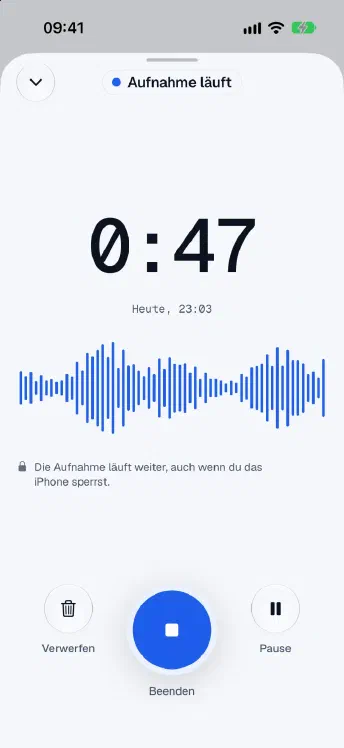
  1. Recording screen of Capture with elapsed time, waveform and the buttons Discard, Finish and Pause

    Record

    Tap Record and start talking. You can pause and resume at any time, and the recording keeps running when you lock your iPhone.

  2. A processed idea in Capture with title, project suggestion, short description and audio player

    Process

    Your iPhone transcribes. With Apple Intelligence, it turns what you said into a title, a short description and a project suggestion; without it, the idea gets a title from its first words. The transcript and recording are kept in case you want to listen again.

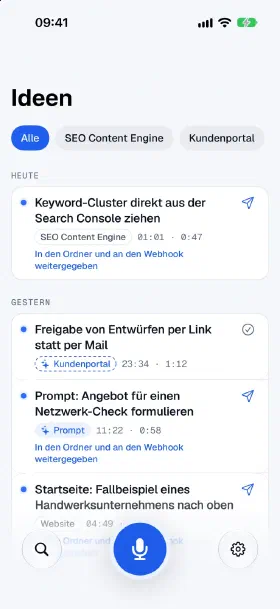
  3. Idea list in Capture, grouped by day, with project filters and a note that ideas were passed on to folder and webhook

    Keep working

    All ideas by day and project, with search in the transcript. You tick off what is done. If you have set up a folder or webhook, every idea goes there automatically, and with “Copy as prompt” you bring it into your AI.

For whom

For everyone who thinks more than they write down.

  • In the car

    On the way to an appointment, the solution comes to you. You speak it in without picking up your phone, for example via Siri.

  • During sport

    Your head is finally clear, and suddenly the idea is there. One tap on the widget, and it's saved.

  • In bed in the evening

    Speak your thoughts, put the phone away, keep working with them the next day. This is exactly how a beta tester uses Capture.

  • Between two appointments

    An idea for a project in progress? With Apple Intelligence, Capture suggests the project right away, and the idea lands where you will look for it later.

Your data

No account. No server for your ideas. No ads.

Your ideas are stored on your iPhone and, if you use iCloud, in your private iCloud. Transcription and processing happen on the device, without the recording being sent to any service. No analytics, no tracking. If you like, you can enter your own OpenAI key and choose whether transcription, processing or both run through OpenAI. Only then do the recording or text go to OpenAI. The only thing that reaches me is what you speak in as feedback yourself and send with “Send”.

Read the data protection information for Capture (in German)
Frequently asked questions

Briefly answered.

What does Capture cost?

During the test phase, Capture is free. You need neither a subscription nor an account for it.

Do I need Apple Intelligence?

No. Transcription runs on your iPhone even without Apple Intelligence. Without it, each idea gets a title from its first words. With Apple Intelligence, the AI writes the title, description and project suggestion.

Do I need an OpenAI key?

No, it is optional. If you like, you enter your own key and have OpenAI create the title and description. OpenAI then bills you directly for the usage; it is not included in a ChatGPT subscription.

Which iPhone do I need?

An iPhone with iOS 26 or newer. For title, description and project suggestion with Apple Intelligence you need an iPhone 15 Pro or newer with Apple Intelligence turned on.

Does Capture work without internet?

Yes. Recording also works in a dead zone. What is meant to go to a cloud folder, a webhook or OpenAI, Capture sends later as soon as there is a network again.

Where do my ideas end up?

On your iPhone and, if you use iCloud, in your private iCloud. They only go further if you set up a folder or a webhook yourself, for example your Obsidian folder or a workflow in n8n.

Test phase

Try Capture.

Capture comes to your iPhone via TestFlight. TestFlight is Apple's app for test versions. Send me a short message and I'll send you access. And tell me what's missing while you test: that is exactly what the test phase is for.

Christoph Harrisonbuilds Capture himself